Webpages
- Details
- Written by: Scott Savett
- Category: Webpages
- Published:
- Hits: 0 2390
There are two different (but similar) places where NCEMSF keeps track of institutional information:
- Under your administrative (private) profile. This information is used for membership and billing purposes. We ask for bare-bones administrative information. To update this information, please {show accesslevels="Institutional"}click here{/show}{show accesslevels!="Institutional"}log in with your group's Institutional account, select the My Profile link from the Membership menu, then pick Edit{/show}.
- In your database (public) profile. This information drives the EMS Organization Database. It provides details about your organization. Due to the nature of the data, we expect this information to be updated more frequently than your administrative profile.
- If your group already has a profile, please {show accesslevels="Institutional"}click here{/show}{show accesslevels!="Institutional"}log in with your group's Institutional account, select Institutional Database Profile from the Membership menu to return to this article, and click the custom link that will be displayed after logging in{/show} to view your database profile. Once the new page loads, click on the "Edit" button next to your group's name to update the information.
- If no listings are shown after following the directions above but your squad has a profile in the EMS Organization Database, file a helpdesk ticket so we can link the profile with your squad's institutional account.
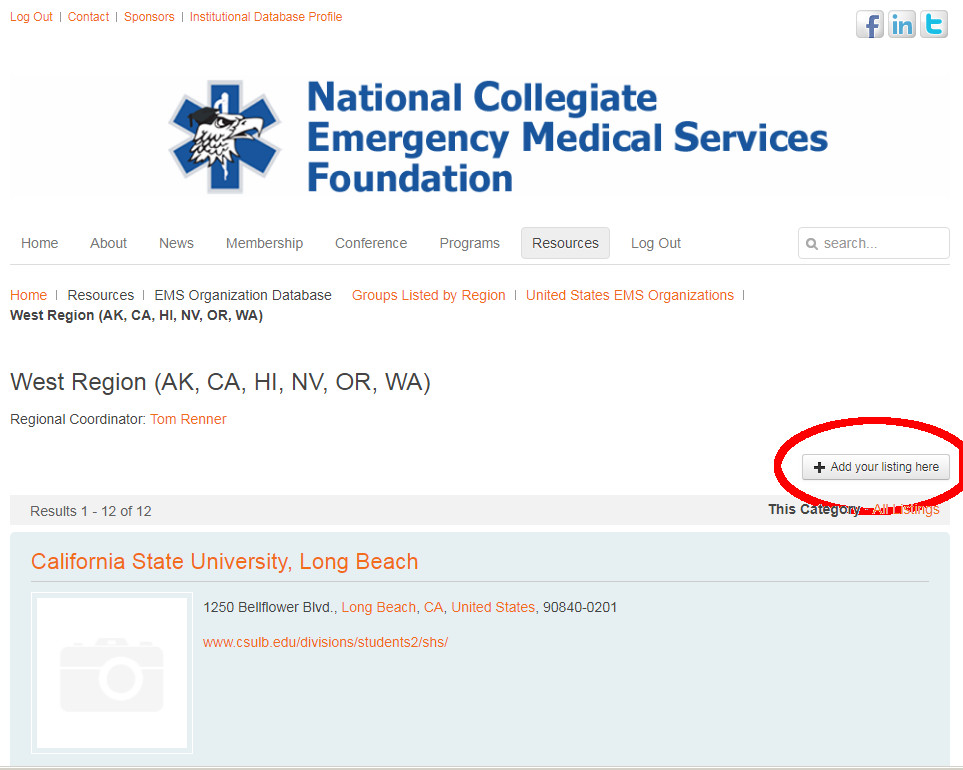
- If no listings are shown after following the directions above and you have checked the page for your region (see the list of all regions) and do not see a profile for your group, you can create a new profile. Go to the listing for your school's region (West is shown in the example below) and click the button near the top right to add a listing. New listings will require approval by a moderator to prevent Spam and accidental duplicates.
- Details
- Written by: Scott Savett
- Category: Webpages
- Published:
- Hits: 0 13687
The Boston Marriott Copley Place is one of two hotels attached to the Copley Place Mall, located in Boston's Back Bay neighborhood. Many of the Victorian brownstone homes built in the 19th century (when parts of the bay were filled in to create the neighborhood) are still present in the neighborhood, making it a prime example of urban design of that era. Copley Square sits in the center of Back Bay, and is home to Trinity Church (a National Historic Landmark), the Boston Public Library's famed McKim Building, the John Hancock Tower (the tallest building in New England), and many other significant buildings.
Copley Place Mall is a 400,000 square-foot shopping business destination. It is known for its upscale tenants, and is connected to the Shops at Prudential Center. Between the two malls, there are approximately 150 different retailers and restaurants within walking distance of the Marriott Copley Place hotel. The MBTA Orange Line's Back Bay station is connected to the mall via a tunnel.
For more information on area attractions, please utilize the following resources:
- Details
- Written by: Scott Savett
- Category: Webpages
- Published:
- Hits: 0 12337
A list of local Crystal City restaurants is no longer available for download.
- Details
- Written by: Scott Savett
- Category: Webpages
- Published:
- Hits: 0 49439
Conference registration opens on December 1st of each year. Once registration is open, please follow the directions below to register as an individual or purchase Tokens on behalf of a group.
Individuals
 Conference registration requires you to have a profile in our database. If you have previously attended an NCEMSF conference, you already have one and you should log in using the right-most menu item or the form at the bottom of each page. Once you do, you will see an "Individual Registration" link on the menu bar beneath the "Conference" menu item.
If you do not have a profile yet, it's easy to create one by clicking here.
If you are not sure of your username or password, use the Forgot login? link at the bottom of any page.
Groups
 Organizations looking to purchase tokens to allow their members to attend should log into the Web site with their institutional account. You can log in using the right-most menu item or the form at the bottom of each page. Upon doing so, a "Purchase Registration Tokens" link beneath the "Conference" menu item will be shown. Once the tokens have been purchased and issued, you can distribute the code to your members for use during the individual registration process.
If you have forgotten your username or password, you can have it sent to you via e-mail. Having problems logging in? Please contact membership services for additional assistance.
- Details
- Written by: Scott Savett
- Category: Webpages
- Published:
- Hits: 0 12753
You are currently logged in as an institution. Only individuals can register for the conference.
If you would like to pay for your members to attend the conference, please purchase tokens. Upon completion of your token purchase, you will be provided with a unique code that you can distribute to your members. They will use the code when they register individually and their fee will be automatically reduced to $0.