Conference 2018 Articles
- Details
- Written by: Ian Feldman
- Category: Conference 2018 Articles
- Published:
- Hits: 0 4037
As part of NCEMSF's 25th Anniverseary celebrations, we will be putting together a video of our organization's history.
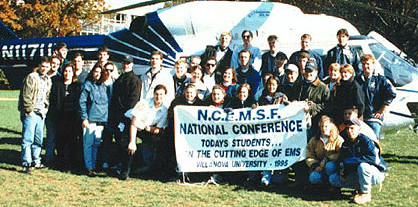
1995 Conference, Villanova University
If you have photos or videos from the past 25 years of NCEMSF Conferences, Collegiate EMS Weeks, and other Collegiate EMS activities, please submit them through our website. Thanks!
- Details
- Written by: Ian Feldman
- Category: Conference 2018 Articles
- Published:
- Hits: 0 4185
The following schools attended the 25th Annual NCEMSF Conference:
| School | State/Province | NCEMSF Region |
| Arizona State University | AZ | Central |
| Bard College | NY | New York |
| Binghamton University | NY | New York |
| Boston College | MA | Massachusetts |
| Brandeis University | MA | Massachusetts |
| Brown University | RI | Northeast |
| Carnegie Mellon University | PA | Pennsylvania |
| Case Western Reserve University | OH | Midwest |
| Christiansburg Rescue Squad (VT & RU) | VA | Mid-Atlantic |
| Clark University | MA | Massachusetts |
| Clarkson University | NY | New York |
| Colby College | ME | Northern New England |
| Colorado College | CO | Central |
| Columbia University | NY | New York |
| Cornell University | NY | New York |
| Dartmouth College | NH | Northern New England |
| Drexel University | PA | Pennsylvania |
| Duke University | NC | Southeast |
| Eckerd College | FL | Southeast |
| Embry-Riddle Aeronautical University | FL | Southeast |
| Emmanuel College | MA | Massachusetts |
| Emory University | GA | Southeast |
| Florida State University | FL | Southeast |
| Fordham University | NY | New York |
| Franklin and Marshall College | PA | Pennsylvania |
| Georgetown University | DC | Mid-Atlantic |
| Gettysburg College | PA | Pennsylvania |
| Harvard University | MA | Massachusetts |
| John Carroll University | OH | Midwest |
| Johns Hopkins University | MD | Mid-Atlantic |
| Juniata College | PA | Pennsylvania |
| Lafayette College | PA | Pennsylvania |
| Lehigh University | PA | Pennsylvania |
| Loyola Marymount University | CA | West |
| Macalester College | MN | North Central |
| Massachusetts Institute of Technology | MA | Massachusetts |
| McMaster University | ON | Canada |
| Mount Holyoke College | MA | Massachusetts |
| Muhlenberg College | PA | Pennsylvania |
| Northeastern University | MA | Massachusetts |
| Northwestern University | IL | North Central |
| Norwich University | VT | Northern New England |
| Pennsylvania State University | PA | Pennsylvania |
| Queen's University | ON | Canada |
| Radford University | VA | Mid-Atlantic |
| Rensselaer Polytechnic Institute | NY | New York |
| Rice University | TX | Central |
| Rochester Institute of Technology | NY | New York |
| Rowan University | NJ | Northeast |
| Ryerson University | ON | Canada |
| Saint Anselm College | NH | Northern New England |
| Saint Michael's College | VT | Northern New England |
| Santa Clara University | CA | West |
| Skidmore College | NY | New York |
| St. Lawrence University | NY | New York |
| Stanford University | CA | West |
| Stockton University | NJ | Northeast |
| SUNY Canton | NY | New York |
| SUNY College at Cortland | NY | New York |
| SUNY Geneseo | NY | New York |
| SUNY Oneonta | NY | New York |
| SUNY Oswego | NY | New York |
| SUNY Stony Brook | NY | New York |
| Syracuse University | NY | New York |
| Temple University | PA | Pennsylvania |
| Texas A&M University | TX | Central |
| The College of New Jersey | NJ | Northeast |
| The George Washington University | DC | Mid-Atlantic |
| The University of Texas at Dallas | TX | Central |
| Tufts University | MA | Massachusetts |
| Tulane University | LA | Central |
| United States Merchant Marine Academy | NY | New York |
| University at Albany, NY | NY | New York |
| University of Arizona | AZ | Central |
| University of California - Irvine | CA | West |
| University of California - Los Angeles | CA | West |
| University of Chicago | IL | North Central |
| University of Dayton | OH | Midwest |
| University of Delaware | DE | Mid-Atlantic |
| University of Florida | FL | Southeast |
| University of Guelph | ON | Canada |
| University of Illinois at Urbana-Champaign | IL | North Central |
| University of Iowa | IA | North Central |
| University of Massachusetts Amherst | MA | Massachusetts |
| University of Massachusetts Lowell | MA | Massachusetts |
| University of New England | ME | Northern New England |
| University of Pennsylvania | PA | Pennsylvania |
| University of Pittsburgh | PA | Pennsylvania |
| University of Rhode Island | RI | Northeast |
| University of Richmond | VA | Mid-Atlantic |
| University of Rochester | NY | New York |
| University of Southern California | CA | West |
| University of Vermont | VT | Northern New England |
| University of Western Ontario | ON | Canada |
| University of Windsor | ON | Canada |
| USciences | PA | Pennsylvania |
| Utica College | NY | New York |
| Vassar College | NY | New York |
| Vermont Technical College | VT | Northern New England |
| Villanova University | PA | Pennsylvania |
| Virginia Polytechnic Institute and State University | VA | Mid-Atlantic |
| Wake Forest University | NC | Southeast |
| Washington University - St. Louis | MO | Central |
| West Chester University of PA | PA | Pennsylvania |
| Western Carolina University | NC | Southeast |
| Western University | ON | Canada |
| Worcester Polytechnic Institute | MA | Massachusetts |
| Yale University | CT | Northeast |
- Details
- Written by: Scott Savett
- Category: Conference 2018 Articles
- Published:
- Hits: 0 13028
Here are some frequently asked questions about annual NCEMSF conferences that might be helpful to others:
Q: I don't see a way to register for the conference. Where can I find the link to registration?
A: You must log into the NCEMSF site to register for the conference. Once you log in, you will see a "Conference Registration" link under the Conference menu item. If you have previously attended an NCEMSF conference, you already have an account. If you forgot your account password, you can have it sent to you. If you are new to NCEMSF, just create a new personal account and then log in to the site.
Q: Our school is going to pay for our conference registration. How can we register as a group and pay together?
A: While each conference attendee must individually register for the conference, it is still possible to pay as a group. You have two choices:
1. At the end of the conference registration process, each attendee can indicate that they are mailing payment. Then you can total everybody's individual registration fees and send us a single check or a purchase order for the total amount. Please make certain to indicate the names and registration numbers of each attendee on the check or purchase order so that the payment may be appropriately credited. Keep in mind there is a 14-day window between when a person registers and when they will be automatically cancelled if we have not received payment.
2. Log in to the Web site as your group's NCEMSF institutional user and purchase registration tokens (via credit card, check, money order, or purchase order). This allows an organization to pre-pay for a set number of attendees without specifying who will be attending. Once we receive payment for the tokens, you will be supplied with a limited-use token code that you'll give to each of your attendees to use when registering. As they register for the conference, they will enter that code, which will debit your account and set their individual balance to $0.
Please refer to the Fees and Policies page as well as the online registration utility for further details.
Q: Does every member of our organization who is wishing to attend have to become an NCEMSF personal member prior to registering for the conference?
A: Every member of your organization who wishes to attend the conference must register on the NCEMSF Web site prior to registering for the conference. Whether they pay personal membership dues as part of their NCEMSF Web site registration is up to the individual. There is a conference pricing differential for members vs. non-members. All conference attendees will become NCEMSF members for the remainder of the academic year as a result of conference attendance. See the Membership section of the Web site for further details.
Q: Must you be a certified (or licensed) EMS provider to attend the NCEMSF conference?
A: No. We welcome anybody with a relationship to collegiate EMS. You do not have to be a first responder, EMT, or paramedic to attend, though much of our educational content is geared towards EMS providers. We do offer administrative content that would be suited for collegiate EMS groupies without a strong EMS background.
Q: Can I earn continuing education credits (con-ed, CME, etc.) by attending the NCEMSF conference?
A: Yes. Following the conference, you will be able to logon to the NCEMSF website, claim credit for sessions attended, and print out your personalized conference con-ed report. That report may then be submitted along with any other necessary identifiers (address, certification number, date of birth, etc.) to NREMT or your state's EMS regulatory agency for credit by endorsement. Some states may require a copy of the conference program or other information as well. Because the membership of NCEMSF comes from across North America, it is exceedingly difficult and cost prohibitive to set up a system where credit can be directly transmitted to the states and automatically issued for attending a lecture; however, we provide assistance in obtaining credit by certifying attendance and providing supporting documentation that most EMS regulatory agencies accept.
Q: One delegate from our group can't make it. Can we swap out a different person in their place?
A: Yes. If they don't already have an account from attending a previous NCEMSF conference or being a personal member of NCEMSF, please have the second person register for an account on the NCEMSF Web site. After registering for an account, the person should register for the Annual Conference. When prompted for payment type, they should select "Mail in Payment" or something similar. Once the person is registered for the conference, please send an e-mail to
Q: I didn't pay within the 14-day window and I received an e-mail telling me I was cancelled. What do I do now?
A: If your exisitng registration shows as "Cancelled," you may re-register without issue. If your existing registration is still unpaid but not yet cancelled, the system will not let you register again. Instead, please go to your Orders page, find the unpaid order, and pay using the "Pay Now" button (you can also select another payment method from this page).
Q: I sent my check or purchase order prior to the deadline, but I received an email saying my order was cancelled. What do I do?
A: The cancellation emails are sent automatically by our system, but our staff will use the actual receipt date of your check or purchase order in determining whether payment was received on time. If your Purchase Order or check was sent by the deadline, our staff can reinstate your order and set it to paid, even after the 14-day deadline. If you are concerned about meeting the deadline and are paying by Purchase Order, you may also send a scanned copy to
Q: How can I see how many unspent tokens my organization has?
A: You must log into the NCEMSF site as the organization. Once logged in, you should see an item under the Conference menu item for "My Token Purchases." Click on that link and you will see your history of token purchases and their usage.
Q: I am having issues paying for tokens with PayPal. Why might this be?
A: There are several potential causes for PayPal issues while purchasing tokens. Please see below for some suggestions.
- University-imposed limits on the card: While a college/university purchasing card can be used at places that accept credit cards (including PayPal), it is not exactly the same as a credit card. Your institution may have limits on the card. These can include a daily spending limit, a per-vendor daily limit, as well as restrictions on specific vendors (like PayPal). If your card is rejected, you should contact your school's department that issues the cards (often the purchasing department or controller's office). They can help you identify the cause of the declined payment, and potentially adjust the card limits to let your register or provide information on alternate methods of payment. You can also try breaking your token purchase into several smaller purchases. Please note that each smaller order will have its own token code, so keep track of how many students register with each code so as to avoid a registration being rejected because the token code has reached its maximum number of uses. Also, be aware that some Universities specifically prohibit splitting purchasing card transactions to get around a spending limit, so work with your school's purchasing department to find out what will work.
- Card not associated with a PayPal account: In an effort to prevent fraud, PayPal may not allow you to pay with a credit card and not log in. To fix this, create a PayPal account associated with the purchasing card, and verify the account prior to trying to make the token purchase. Be sure to associate the account with a squad email address (not your personal email) so that other members of your group can access it (see next issue).
- Card is associated with another PayPal account: PayPal may prevent one card from being used with multiple accounts. If a PayPal account was previously created by someone from your institution and associated with the card you are trying to use, you will need to log into the existing account first. You may need to contact past officers to find that information.
- Card is associated with a cancelled PayPal account: If a past officer created a PayPal account for the credit card you're trying to use, PayPal may not let you use the card without logging in, even if the original account was cancelled. Creating a new account and verifying the card may fix the issue, or you may need to work with your institution's purchasing department to get a new card issued.
Q: What is an "Institutional Purchase Order"?
A: A purchase order is an agreement from your college/university to a vendor (like NCEMSF) to pay for certain goods or services in a specified period of time. The purchase order process typically proceeds as follows:
- You tell your purchasing department or other appropriate university department that you wish to purchase a certain quantity of registration tokens from NCEMSF at a specified price.
- The purchasing department issues a purchase order.
- You purchase the tokens, selecting "Purchase Order" as the payment type. Enter the PO Number in the appropriate field.
- You send the purchase order to NCEMSF, via mail, email, or fax.
- Upon receipt of the purchase order document, we approve the order and the tokens are issued.
- NCEMSF sends an invoice to your school's purchasing department for the total amount of the order.
- You coordinate with your school's purchasing department to confirm that the goods you requested (tokens) were received, and the purchasing department pays NCEMSF.
This method allows NCEMSF to work with your school's purchasing department, saving you from having to deal with checks or credit cards. And it gives the purchasing department assurances that the money was spent on the requested goods and that the goods were received prior to them releasing funds. Please note that the purchase order process may take time to set up, and you may need to work with NCEMSF and your purchasing department to set NCEMSF up as an approved vendor, so please allow time if you chose to pay via purchase order (the time needed depends on your institution). If your purchasing department requires NCEMSF's W-9 or other tax documentation, it can be found here. All purchase orders sent to NCEMSF must be complete in order to be accepted (including all necessary signatures). If you send us your purchase order via email or fax in order to meet the 14-day deadline, please also mail us a hard copy (which does not need to arrive prior to the 14-day deadline, so long as we did receive the electronic copy within the allowed time).
Q: How do I pay with a token code?
A: Token codes are entered during registration checkout. To register with a token code:
- Log in to the NCEMSF website.
- In the Conference menu, select Individual Registration.
- Select "Add to Cart" on the registration option for the current registration period (you should only have one choice).
- On the checkout page, enter your name and address, if necessary.
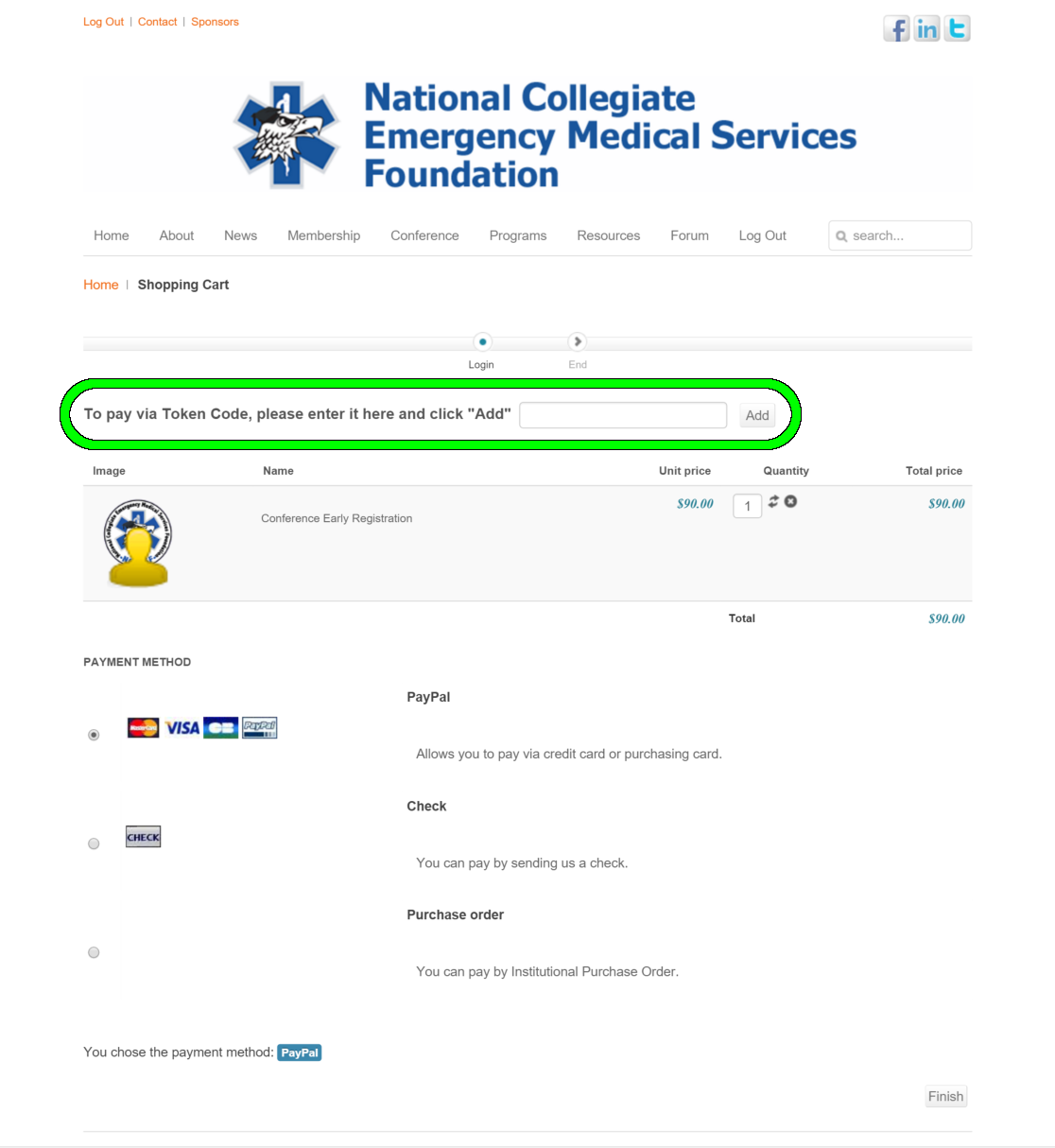
- After entering your name and address (if applicable), look below the menu bar, but above the cart contents and payment options, for a box for your token code. Enter the token code in that box, then click the "Add" button to the right of the box. Please see below for an example of what this looks like.
- The cart will refresh, and if your token code is valid, the cart will show a zero balance and you will no longer be given a choice of payment options.
- To submit the registration, click the "Finish" button at the bottom right of the screen.
- You will receive an email from us letting you know your order was created, and then within a minute you should receive a second email confirming your registration. The registration confirmation email will contain a registration number starting with "DT-".
- Details
- Written by: Scott Savett
- Category: Conference 2018 Articles
- Published:
- Hits: 0 4595
Initially introduced at the 2002 Annual Conference, The Richard W. Vomacka Student Speaker Competition is named for an NCEMSF mentor who passed away in October 2001. This symposium is a chance for student lecturers to showcase their presentation skills and earn bragging rights for their collegiate EMS organization. The competition is judged on a speaker's ability to deliver a relevant high-quality seminar to his/her peers - points are awarded based on strength of the submitted abstract, quality of the delivered presentation and audiovisual materials.
Topics should be relevant to the practice and maintenance of a collegiate EMS organization. While you may reference the activities of your own squad in your presentation, your talk should not be exclusively a reflection of your own squad’s patterns of practice. Reflecting on personal practices is appropriate, but should be supplemented by an adequate literature search regarding your topic.
Vomacka presentations may be co-presented by up to two speakers from the same institution. The committee will select between six and eight submissions to be presented and judged at the conference. In general, multiple submissions from the same institution will not be selected, but all are encouraged to submit. All Vomacka Student Speaker Competition participants must be paid conference attendees. Complimentary conference attendance is only available for non-student presenters.
The deadline for submitting abstracts for the 2018 Vomacka Student Speaker Competition was January 30, 2018. Applicants will be notified of the committee's decision by February 6, 2018.
All Vomacka Student Speaker applications must be submitted online and you must be logged in to our website to submit. Please follow these directions to ensure your submission is correctly routed:
Be sure to select "Vomacka Student Speaker Competition" under "Submission Type."
You will need the following information to complete your submission:
- Full name(s) of speaker (as it should appear on a name tag and in the published program with academic degrees and clinical certifications)
- School Affiliation / Campus Based EMS Group and any applicable leadership titles
- Email address(es) and Telephone number
- A brief biography (100 words) suitable for printing as well as a current CV and/or resume
Your CV/Resume will be uploaded after submitting the online form. Follow the link from the submission confirmation page to the file upload section. You must be logged in to upload files. Resumes can in be Microsoft Word (.doc or .docx) or Adobe Acrobat (.pdf). If you are co-presenting your Vomacka talk with a second person, there are two options for resumes; upload one resume to each option to avoid over-writing your co-presenter's resume. - Proposed talk title and abstract both suitable for printing (abstracts should be no more than 200 words)
- A detailed outline of the proposed 45 minute presentation is encouraged as well
Your outline will be uploaded after submitting the online form. Follow the link from the submission confirmation page to the file upload section. You must be logged in to upload the file. This can be Microsoft Word (.doc or .docx) only.
After submitting the online form, please be sure to upload your Resume/CV and your Presentation Outline using the links on the site. You must be logged in to upload files. If you are co-presenting your Vomacka talk with a second individual, you can submit them as separate files (Resume 1 and Resume 2), but both must be uploaded by the person who made the original submission. Please remember that your application is not complete without uploading your Resume/CV and your Presentation Outline. Only fully complete applications will be considered.
The deadline for Richard W. Vomacka submission was January 30, 2018.
- Details
- Written by: Scott Savett
- Category: Conference 2018 Articles
- Published:
- Hits: 0 5092
Hotel Directions and Transportation
Detailed information about transportation options to the host hotel can be found on the hotel's Web site.
Taxis from Philadelphia International Airport to the hotel charge a flat rate of $28.50, plus $1 for each additional passenger. Return taxi trips to the airport are $28.50, regardless of the number of passengers. Shared ride van and limousine services are available, as described on the airport's website (look for providers that serve Center City).
Hotel Parking
Parking is availble in the hotel's underground garage for a discounted rate of $20 per day at the hotel for self-park with unlimited in-and-out privileges. The hotel garage has a vertical clearance of 6'3". Parking is also available across the street at the Philadelphia Parking Authority's Gateway Garage, which offers a rate of $7 a day between 5 p.m. Friday and 9 a.m. Monday, and has a vertical clearance of 6'10".
For information on other parking options, inlcuding off-site parking for oversized vehicles, please see ParkMe or Parkopedia. These parking resources are provided as a courtesy, and are managed by outside providers not affiliated with NCEMSF or the host hotel. NCEMSF and the host hotel are not responsible for the accuracy or appropriateness of the content that they provide.