Conference 2017 Articles
- Details
- Written by: Scott Savett
- Category: Conference 2017 Articles
- Published:
- Hits: 0 4882
Here are the steps to contributing to the Conference 2017 photo archives:
- Log into Flickr or create a new account (you can use your existing Yahoo! login if you have one).
- Join the Conf2017 group at https://www.flickr.com/groups/conf2017
- Upload your photos to your personal Flickr Photostream.
- Go into the organization portion of your Flickr account: https://www.flickr.com/photos/organize
- Drag photos you want to add to the group into the Batch Edit part of the screen.
- Click on the "Send to group" link towards the top of the screen.
- Select the Conf2017 group and wait while the photos are transferred.
- Add captions and details to your photos in the Conf2017 group.
Questions? Please contact
- Details
- Written by: Scott Savett
- Category: Conference 2017 Articles
- Published:
- Hits: 0 6524
Discounts at Local Venues
NCEMSF Conference Attendees are eligible to receive discounts at various area restaurants and entertainment venues through Visit Baltimore's Show Your Badge program. For a listing of participating restaurants and venues, please see the Show Your Badge brochure. To receive these discounts, present your NCEMSF Conference ID Badge at the venue. Please note:
- Your badge must be presented at the time of purchase.
- This discount is not valid with any other coupon or reduced price offer.
- This discount is not redeemable for cash or gift card purchase.
- Applicable taxes paid by bearer.
- Certain restrictions may apply to individual restaurants.
Consult with staff at each venue for any limitations that may apply.
About Baltimore
Captain John Smith explored the Chesapeake Bay in 1608. Twenty four years later, King Charles I of England granted a charter for Maryland to Cecil Calvert, also known as Lord Baltimore. Maryland was named in honor of Henrietta Maria, queen consort of Charles I. The boundary between Maryland and Pennsylvania in the north was not surveyed until the 1760s when Charles Mason and Jeremiah Dixon established the line. Maryland ceded land to form the District of Columbia in 1791.
A legislative act was passed in 1729 to create the city of Baltimore. In the 1760s, the population began expanding rapidly, and the American Revolution spurred even more economic and physical growth that ultimately made Baltimore a leading supply center. Baltimore sits right on the Chesapeake Bay, which produces more seafood than any other body of water of comparable size. Today, Baltimore’s port ranks second in the nation for most foreign tonnage.
Any tour of Baltimore starts with the Inner Harbor, Baltimore’s showpiece revamped in the late 1970s. Harborplace, a three-acre retail, dining, and entertainment complex, anchors the Inner Harbor. Other attractions include the National Aquarium, Maryland Science Center, World Trade Center, Power Plant Live! (Baltimore’s premier dining and entertainment experience featuring restaurant row, pubs, comedy and night clubs), and the Tall Ships. Across the water you might be able to see Fort McHenry.
Baltimore Fast Facts
Population: 777,184 (4th largest city on the East Coast) Elevation: 33 ft
Area: 81 sq mi
Nicknames: “Monument City,” “Charm City,” “B’more”
More About Baltimore’s Neighborhoods
Downtown
Downtown includes City Center, the Inner Harbor, West Side, and Camden Yards. This is the core of Baltimore City. Camden Yards is home to both the Baltimore Orioles (Oriole Park) and the Baltimore Ravens (M&T Bank Stadium). City Center includes historic Charles St. and its famous Market Place that is home to many businesses. West Side includes University Center, home to the University of Maryland Medical Center and R Adams Cowley Shock Trauma Center
Little Italy
Immediately east of downtown is Little Italy known now for its over 20 amazing restaurants and dessert establishments in a 12 square block area. It is within walking distance from Fell’s Point, Camden Yards, and the Inner Harbor. Borders include Pratt St. to the north, Eden St. to the east, the Jones Falls Bulkhead to the west, and the Inner Harbor to the south. How to get there: Follow Pratt St. east past the Inner Harbor until you reach Albemarle St. Make a right.
Fell’s Point
Just past Little Italy is Fell’s Point, a historic waterfront community once the chief Colonial shipbuilding center that is now known for its craft and antique shops, coffeehouses, restaurants, great pubs, and nightlife. Fells Point is bounded by Gough St. to the north, Caroline and Chester Streets to the west and east, respectively, and the Chesapeake Bay to the south. How to get there: Follow Pratt St. east past the Inner Harbor. Make a right onto President St. Turn left onto Fleet St. and then take a right onto Broadway. Head south until you hit the Market Square.
Mount Vernon
Mount Vernon, one of the city’s loveliest neighborhoods, is a National Registry Historic District Its chief feature is a park of shrub-lined lawns and flowerbeds, laid out in the form of a cross. The 178-foot tall monument to George Washington stands at the Park’s center. Mount Vernon is also home to the Peabody Institute, the Walters Art Gallery, the Enoch Pratt Free Library and the Charles Movie Theatre. How to get there: Follow Pratt St. east towards the Inner Harbor. Take a left on Charles St. and head north until you hit the Washington Monument. Amtrak’s Baltimore Penn Station and Johns Hopkins University’s Homewood Campus are both slightly farther north on Charles St.
Navigating Baltimore
If you drove to the conference, we recommend parking and leaving your vehicle until you are ready to depart. Driving around and parking in Baltimore can be confusing and costly. We strongly recommend walking, taking a taxi, or utilizing public transportation. Baltimore is a very walkable city and the host hotel is conveniently located close to most attractions - just be sure to walk in groups and stay in well-lit areas.
Many attractions on the Inner Harbor as well as some of the neighborhoods of note in Baltimore are served by a free shuttle service. Learn more on our Transportation page.Coming Early? Staying Late?
For those spending some extra time in Baltimore either pre- or post-conference below are a few of the dozens of attractions in and around the city.
EMS Points of Interest
Baltimore City Fire Department - John F. Steadman Fire Station - Located at the corner of W. Lombard and S. Eutaw Streets, the Fire Station is one of the largest in the United States housing over 15 active pieces of apparatus and a shift of 21 employees. The station opened on September 11, 1973 and is named after beloved Deputy Chief John F. Steadman, a 27 year veteran of the Department, who died while giving a report to the fire board on March 7, 1940.
Maryland Institute for Emergency Medical Services Systems - Located at 635 W. Pratt St., MIEMSS coordinates the statewide EMS network that includes volunteer and career EMS providers, medical and nursing personnel, communications, transportation systems, trauma and specialty care centers, and emergency departments. Within MIEMSS is the Emergency Medical Resources Center (EMRC) that coordinates consultations between medic units and hospital physicians and the System Communication Center (SYSCOM) that coordinates all State Police Med-Evac missions.
The R Adams Cowley Shock Trauma Center - R Adams Cowley is considered the father of trauma care and gave the world the concept of the Golden Hour. Only a few blocks from the hotel, the Shock Trauma Center is one of the world’s only stand-alone trauma hospitals and is dedicated to treating the severely injured and employing groundbreaking research and innovative medical procedures with one goal in mind - saving lives. It is the core element of the state’s emergency medical system and serves as the state’s primary adult trauma clinical resource center.
Historical Sites
Ft. McHenry National Monument and Historic Shrine - Location where Baltimoreans defeated the British in 1814, inspiring Francis Scott Key to write the “Star Spangled Banner.” Also see the Flag House and Star-Spangled Banner Museum (844 E. Pratt St.)
2400 E. Fort Ave; (410) 962-4290
Baltimore Civil War Museum - The restored President Street Station, built in 1849, was first a stop on the Underground Railroad. On April 19, 1861 it became the site of the first casualties of the Civil War. Also see the U.S.S. Constellation - the last surviving ship of the Civil War, and the last all-sail ship built by the U.S. Navy - located at Pier 1 in the Inner Harbor.
Museums
Baltimore Museum of Art - The museum holds the second largest publicly displayed collection of Andy Warhol’s work. Other artists whose works on display include van Gogh, Renoir, Matisse and Picasso - to name a few. 10 Art Museum Dr; (443) 573-1700
Babe Ruth Birthplace Museum - Visit the Babe’s home, which celebrates his Baltimore roots and displays his boyhood bat and other artifacts. It is also the official repository of Orioles team memorabilia. Also see Sports Legends at Camden Yards (301 W. Camden St.) 216 Emory St; (410) 727-1539
The Baltimore and Ohio (B&O) Railroad Museum - Featuring a large collection of locomotives that visitors are welcome to climb aboard and inspect. 901 W. Pratt St; (410) 752-2490
Maryland Science Center and IMAX Theater - Exhibits include Dinosaur Mysteries, Newtown's Alley, Cells: The Universe Inside Us, Your Body: The Inside Story, and Life Beyond Earth. Current IMAX features include Beavers, Journey to Space, and Lewis & Clark: Great Journey West. 601 Light St; (410) 685-5225
The National Aquarium in Baltimore - 501 E. Pratt St; (410) 576-3800
Food, Dining and Night Life
For dinner, we encourage you to venture out of the hotel and grab a bite in either the Inner Harbor or PowerPlant Live areas. If you desire to explore farther, head to Little Italy or Fells Point. Group up with another squad and eat together.
- Details
- Written by: Scott Savett
- Category: Conference 2017 Articles
- Published:
- Hits: 0 16706
Here are some frequently asked questions about annual NCEMSF conferences that might be helpful to others:
Q: I don't see a way to register for the conference. Where can I find the link to registration?
A: You must log into the NCEMSF site to register for the conference. Once you log in, you will see a "Conference Registration" link under the Conference menu item. If you have previously attended an NCEMSF conference, you already have an account. If you forgot your account password, you can have it sent to you. If you are new to NCEMSF, just create a new personal account and then log in to the site.
Q: Our school is going to pay for our conference registration. How can we register as a group and pay together?
A: While each conference attendee must individually register for the conference, it is still possible to pay as a group. You have two choices:
1. At the end of the conference registration process, each attendee can indicate that they are mailing payment. Then you can total everybody's individual registration fees and send us a single check or a purchase order for the total amount. Please make certain to indicate the names and registration numbers of each attendee on the check or purchase order so that the payment may be appropriately credited. Keep in mind there is a 14-day window between when a person registers and when they will be automatically cancelled if we have not received payment.
2. Log in to the Web site as your group's NCEMSF institutional user and purchase registration tokens (via credit card, check, money order, or purchase order). This allows an organization to pre-pay for a set number of attendees without specifying who will be attending. Once we receive payment for the tokens, you will be supplied with a limited-use token code that you'll give to each of your attendees to use when registering. As they register for the conference, they will enter that code, which will debit your account and set their individual balance to $0.
Please refer to the Fees and Policies page as well as the online registration utility for further details.
Q: Does every member of our organization who is wishing to attend have to become an NCEMSF personal member prior to registering for the conference?
A: Every member of your organization who wishes to attend the conference must register on the NCEMSF Web site prior to registering for the conference. Whether they pay personal membership dues as part of their NCEMSF Web site registration is up to the individual. There is a conference pricing differential for members vs. non-members. All conference attendees will become NCEMSF members for the remainder of the academic year as a result of conference attendance. See the Membership section of the Web site for further details.
Q: Must you be a certified (or licensed) EMS provider to attend the NCEMSF conference?
A: No. We welcome anybody with a relationship to collegiate EMS. You do not have to be a first responder, EMT, or paramedic to attend, though much of our educational content is geared towards EMS providers. We do offer administrative content that would be suited for collegiate EMS groupies without a strong EMS background.
Q: Can I earn continuing education credits (con-ed, CME, etc.) by attending the NCEMSF conference?
A: Yes. Following the conference, you will be able to logon to the NCEMSF website, claim credit for sessions attended, and print out your personalized conference con-ed report. That report may then be submitted along with any other necessary identifiers (address, certification number, date of birth, etc.) to NREMT or your state's EMS regulatory agency for credit by endorsement. Some states may require a copy of the conference program or other information as well. Because the membership of NCEMSF comes from across North America, it is exceedingly difficult and cost prohibitive to set up a system where credit can be directly transmitted to the states and automatically issued for attending a lecture; however, we provide assistance in obtaining credit by certifying attendance and providing supporting documentation that most EMS regulatory agencies accept.
Q: One delegate from our group can't make it. Can we swap out a different person in their place?
A: Yes. If they don't already have an account from attending a previous NCEMSF conference or being a personal member of NCEMSF, please have the second person register for an account on the NCEMSF Web site. After registering for an account, the person should register for the Annual Conference. When prompted for payment type, they should select "Mail in Payment" or something similar. Once the person is registered for the conference, please send an e-mail to
Q: I didn't pay within the 14-day window and I received an e-mail telling me I was cancelled. What do I do now?
A: If you still intend to attend the conference, e-mail
Q: How can I see how many unspent tokens my organization has?
A: You must log into the NCEMSF site as the organization. Once logged in, you should see an item under the Conference menu item for "My Token Purchases." Click on that link and you will see your history of token purchases and their usage.
Q: What if I paid via PayPal but never received an email from NCEMSF confirming my registration?
A: After paying with PayPal, you should receive both a receipt email from PayPal as well as a confirmation email from us (which includes a confirmation number starting with DT-). If you do not get both emails within ten minutes of completing your PayPal payment, please do the following:
- Go to www.ncemsf.org/support
- Click the New Support Ticket button
- Choose Conference (the third option)
- Let us know that you never received a registration confirmation after paying with PayPal
- Copy the Transaction ID or Receipt Number from your email confirmation from PayPal (found in the top right corner of the email) into the ticket
- Also provide the email address you use with PayPal so we can easily verify your payment
- Finally, provide your NCEMSF Website Username
We will follow up with you within 72 hours with how to finalize your registration.
Q: I am having issues paying for tokens with PayPal. Why might this be?
A: There are several potential causes for PayPal issues while purchasing tokens. Please see below for some suggestions.
- University-imposed limits on the card: While a college/university purchasing card can be used at places that accept credit cards (including PayPal), it is not exactly the same as a credit card. Your institution may have limits on the card. These can include a daily spending limit, a per-vendor daily limit, as well as restrictions on specific vendors (like PayPal). If your card is rejected, you should contact your school's department that issues the cards (often the purchasing department or controller's office). They can help you identify the cause of the declined payment, and potentially adjust the card limits to let your register or provide information on alternate methods of payment. You can also try breaking your token purchase into several smaller purchases. Please note that each smaller order will have its own token code, so keep track of how many students register with each code so as to avoid a registration being rejected because the token code has reached its maximum number of uses. Also, be aware that some Universities specifically prohibit splitting purchasing card transactions to get around a spending limit, so work with your school's purchasing department to find out what will work.
- Card not associated with a PayPal account: In an effort to prevent fraud, PayPal may not allow you to pay with a credit card and not log in. To fix this, create a PayPal account associated with the purchasing card, and verify the account prior to trying to make the token purchase. Be sure to associate the account with a squad email address (not your personal email) so that other members of your group can access it (see next issue).
- Card is associated with another PayPal account: PayPal may prevent one card from being used with multiple accounts. If a PayPal account was previously created by someone from your institution and associated with the card you are trying to use, you will need to log into the existing account first. You may need to contact past officers to find that information.
- Card is associated with a cancelled PayPal account: If a past officer created a PayPal account for the credit card you're trying to use, PayPal may not let you use the card without logging in, even if the original account was cancelled. Creating a new account and verifying the card may fix the issue, or you may need to work with your institution's purchasing department to get a new card issued.
Q: What is an "Institutional Purchase Order"?
A: A purchase order is an agreement from your college/university to a vendor (like NCEMSF) to pay for certain goods or services in a specified period of time. The purchase order process typically proceeds as follows:
- You tell your purchasing department or other appropriate university department that you wish to purchase a certain quantity of registration tokens from NCEMSF at a specified price.
- The purchasing department issues a purchase order.
- You purchase the tokens, selecting "Purchase Order" as the payment type. Enter the PO Number in the appropriate field.
- You send the purchase order to NCEMSF, via mail, email, or fax.
- Upon receipt of the purchase order document, we approve the order and the tokens are issued.
- NCEMSF sends an invoice to your school's purchasing department for the total amount of the order.
- You coordinate with your school's purchasing department to confirm that the goods you requested (tokens) were received, and the purchasing department pays NCEMSF.
This method allows NCEMSF to work with your school's purchasing department, saving you from having to deal with checks or credit cards. And it gives the purchasing department assurances that the money was spent on the requested goods and that the goods were received prior to them releasing funds. Please note that the purchase order process may take time to set up, and you may need to work with NCEMSF and your purchasing department to set NCEMSF up as an approved vendor, so please allow time if you chose to pay via purchase order (the time needed depends on your institution). If your purchasing department requires NCEMSF's W-9 or other tax documentation, it can be found here. All purchase orders sent to NCEMSF must be complete in order to be accepted (including all necessary signatures). If you send us your purchase order via email or fax in order to meet the 14-day deadline, please also mail us a hard copy (which does not need to arrive prior to the 14-day deadline, so long as we did receive the electronic copy within the allowed time).
Q: How do I pay with a token code?
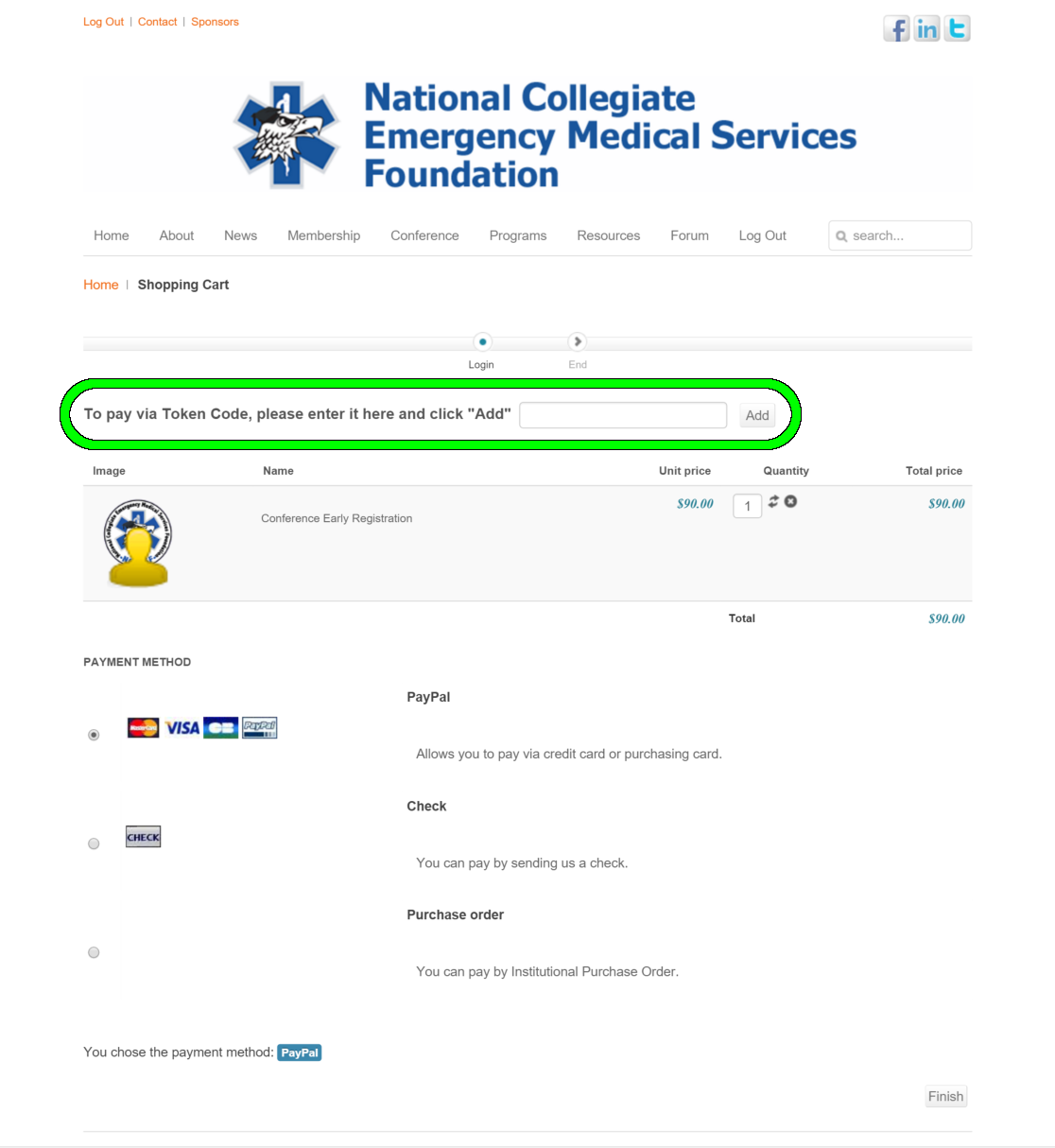
A: Token codes are entered during registration checkout. To register with a token code:
- Log in to the NCEMSF website.
- In the Conference menu, select Individual Registration.
- Select "Add to Cart" on the registration option for the current registration period (you should only have one choice).
- On the checkout page, enter your name and address, if necessary.
- After entering your name and address (if applicable), look below the menu bar, but above the cart contents and payment options, for a box for your token code. Enter the token code in that box, then click the "Add" button to the right of the box. Please see below for an example of what this looks like.
- The cart will refresh, and if your token code is valid, the cart will show a zero balance and you will no longer be given a choice of payment options.
- To submit the registration, click the "Finish" button at the bottom right of the screen.
- You will receive an email from us letting you know your order was created, and then within a minute you should receive a second email confirming your registration. The registration confirmation email will contain a registration number starting with "DT-".
- Details
- Written by: Scott Savett
- Category: Conference 2017 Articles
- Published:
- Hits: 0 4713
Initially introduced at the 2002 Annual Conference, The Richard W. Vomacka Student Speaker Competition is named for an NCEMSF mentor who passed away in October 2001. This symposium is a chance for student lecturers to showcase their presentation skills and earn bragging rights for their collegiate EMS organization. The competition is judged on a speaker's ability to deliver a relevant high-quality seminar to his/her peers - points are awarded based on strength of the submitted abstract, quality of the delivered presentation and audiovisual materials.
Topics should be relevant to the practice and maintenance of a collegiate EMS organization. While you may reference the activities of your own squad in your presentation, your talk should not be exclusively a reflection of your own squad’s patterns of practice. Reflecting on personal practices is appropriate, but should be supplemented by an adequate literature search regarding your topic.
Vomacka presentations may be co-presented by up to two speakers from the same institution. The committee will select between six and eight submissions to be presented and judged at the conference. In general, multiple submissions from the same institution will not be selected, but all are encouraged to submit. All Vomacka Student Speaker Competition participants must be paid conference attendees. Complimentary conference attendance is only available for non-student presenters.
The deadline for submitting abstracts for the 2016 Vomacka Student Speaker Competition was January 30, 2017. Applicants will be notified of the committee's decision by February 6, 2017.
All Vomacka Student Speaker applications must be submitted online, and you must be logged in to our website to submit. Please follow these directions to ensure your submission is correctly routed:
Be sure to select "Vomacka Student Speaker Competition" under "Submission Type."
You will need the following information to complete your submission:
- Full name(s) of speaker (as it should appear on a name tag and in the published program with academic degrees and clinical certifications)
- School Affiliation / Campus Based EMS Group and any applicable leadership titles
- Email address(es) and Telephone number
- A brief biography (100 words) suitable for printing as well as a current CV and/or resume
Your CV/Resume will be uploaded after submitting the online form. Follow the link from the submission confirmation page to the file upload section. You must be logged in to upload files. Resumes can in be Microsoft Word (.doc or .docx) or Adobe Acrobat (.pdf). If you are co-presenting your Vomacka talk with a second person, there are two options for resumes; upload one resume to each option to avoid over-writing your co-presenter's resume. - Proposed talk title and abstract both suitable for printing (abstracts should be no more than 200 words)
- A detailed outline of the proposed 45 minute presentation is encouraged as well
Your outline will be uploaded after submitting the online form. Follow the link from the submission confirmation page to the file upload section. You must be logged in to upload the file. This can be Microsoft Word (.doc or .docx) only.
After submitting the online form, please be sure to upload your Resume/CV and your Presentation Outline using the links on the site. You must be logged in to upload files. If you are co-presenting your Vomacka talk with a second individual, you can submit them as separate files (Resume 1 and Resume 2), but both must be uploaded by the person who made the original submission. Please remember that your application is not complete without uploading your Resume/CV and your Presentation Outline. Only fully complete applications will be considered.
The deadline for Richard W. Vomacka submission was January 30, 2017.
- Details
- Written by: Scott Savett
- Category: Conference 2017 Articles
- Published:
- Hits: 0 6024
Air Travel
Baltimore/Washington International Thurgood Marshall Airport is the city's primary airport. It is located just under ten miles from the hotel, and is served by all major air carriers. Learn more about the airport at its website.
From the Airport - BWI
Baltimore Hyatt Regency does not provide shuttle service to and from BWI, though they do recommend Super Shuttle. Shuttles leave from BWI every 30 minutes between 6:00 am and 2:00 am. Look for the blue vans with yellow "Super Shuttle" lettering near the ground transportation desk at Baggage Claim 3, 4, and 5. A 10% discount off of regular fares thanks to VisitBaltimore's Show Your Badge program is available online or by calling 800-258-3826 and mentioning discount code ZG7TC. Estimated round-trip SuperShuttle fare (with the convention discount but not including gratuity) is $30.60. If you require a wheelchair-accessible van, please mark the appropriate box on the SuperShuttle website or mention it on the phone when reserving service in advance. Wheelchair lifts or ramps may not be available if they are not reserved in advance.
Attendees traveling by air can also utilize a taxi (estimated fare: $35.00). Please go to the lower level curb of any terminal to get a taxi.
MTA operates busses, trains, and light rail from BWI to various destinations, including the host facility.
Mass Transit
The hotel is located just three blocks from the light rail (which runs to BWI) and four blocks from the Metro subway station. Many BUS-MTA routes also serve the hotel. For details on mass transit options, please see the MTA website. Maps and information are also available from the concierge desk at the hotel.
To get to the host hotel from BWI via mass transit:
- Board the Light Rail (200) just outside Terminal E. Fare is $1.60.
- Exit at Convention Center (Pratt St).
- Head east on Pratt St for 0.3 miles (if you are facing your train's direction of travel, east is to the right).
- At S Light St, make a right. The hotel will be on your right.
Automobile
Please see the facility page for links to directions. Parking is $30 per day at the hotel for self-park or $42 per day for valet at the hotel (with unlimited in-and-out privileges). Hourly rates are also available, and are listed on the hotel website. For information on other parking options, including off-site parking for oversized vehicles, please see ParkMe or Parkopedia. These parking resources are provided as a courtesy, and are managed by outside providers not affiliated with NCEMSF or the host hotel. NCEMSF and the host hotel are not responsible for the accuracy or appropriateness of the content that they provide.
The City of Baltimore Parking Authority also operates several parking lots and garages. Six of these (PDF file) are located near stops on the free Charm City Circulator bus lines (see "Shuttle Bus Service to Area Attractions" section below).
Shuttle Bus Service to Area Attractions
The Charm City Circulator (http://www.charmcitycirculator.com/) provides free shuttle service around the Inner Harbor area and other parts of Baltimore. The Conference hotel is served by the following routes:
- Purple Route, running north-south between Penn Station and Federal Hill (Route Map in PDF)
- Orange Route, running east-west between Hollins Market/UMB and Harbor East/Fell's Point (Route Map in PDF)
- Banner Route, running southeast from the hotel to Fort McHenry (Route Map in PDF)
More information, including stops, other connecting lines, and operating hours, is available from the Charm City Circulator website.