Conference 2026 Articles
- Details
- Written by: Scott Savett
- Category: Conference 2026 Articles
- Published:
- Hits: 0 1494
Thank you for attending our 2026 Conference in Arlington, VA. Attendees should check their email for an announcement from NCEMSF on claiming CE credit. Copies of conference lecture slides and photos will be posted in the near future. Learn more at our 2026 Conference page.
Also, please save the dates for our 34th Annual Conference, February 26-28, 2027, with a location to be announced soon!
- Details
- Written by: Ian Feldman
- Category: Conference 2026 Articles
- Published:
- Hits: 0 2624
By completing a Conference registration, you agree to these policies in their entirety. In addition, you may be asked to sign a paper copy of these policies during the on-site check-in process. Please direct all questions to
Special COVID-19 Policy Updates
NCEMSF will continue to follow guidance from the CDC and local health authorities in effect at the time of the Conference in regards to efforts to prevent the spread of COVID-19. Because it is impossible to predict in advance what this guidance will be in February 2026, NCEMSF cannot provide specifics on our COVID-19 mitigation measures. While the present COVID-19 situation and CDC guidance do not require the use of any special conditions, we reserve the right to implement one or more of the following mitigation measures should the CDC guidance change:
- Mask-wearing
- Proof of vaccination
- On-site testing
- Restrictions on capacity of lectures and/or hotel rooms
NCEMSF will do its best to communicate any COVID-19 mitigation measures to all registered and prospective attendees as soon as they are imposed, however by registering for the Conference you agree in advance to comply with any mitigation measures that are in place, and will not be able to request a refund if you are not willing to comply with those measures. As such, our normal fees and policies, including policies regarding cancellations and refunds for registrations, remain in place as outlined on our Fees and Policies page.
Conference Policies
The following exist to ensure a safe and enjoyable conference experience for all attendees:
1) Conference ID badges are required for entry to conference lectures and events and are to be worn by attendees at all times while on the conference premises.
2) Attendees are expected to conduct themselves as the young-adult professionals that they are and to display the same degree of decency and respect toward other conference attendees, hotel guests, and staff that they would exhibit while responding to campus medical emergencies and interacting with patients.
3) Noise production is to be kept to a level appropriate to an indoor hotel environment and is to be respectful of the hour and considerate of the surroundings.
4) The consumption of alcohol by those younger than the federal legal minimum drinking age of 21 years as well as the use of drugs or other illegal substances by attendees of any age is strictly prohibited. Open containers containing alcohol are also forbidden in all conference common areas.
5) Common areas and private rooms of the host facility are to be left in the same fashion in which they were found upon arrival. Any damage to, or destruction of, property will be the financial responsibility of the offending individuals.
6) Participation in conference lectures and activities grants permission for the use of one’s image in NCEMSF publications and promotional materials.
7) Conference speakers are experts in their given fields. The information they present and opinions they express, however, are not necessarily those of NCEMSF. Attendees are reminded to follow their prescribed operating procedures and to contact their agency’s medical director before changing medical protocol.
The aforementioned apply in addition to the stated policies of the host facility as well as local and federal laws. Failure to comply with any of the above may result in eviction from the conference and/or hotel without a refund. Additionally, civil and/or criminal penalties may apply.
Registration for the conference indicates your acceptance of the policies listed.
- Details
- Written by: Ian Feldman
- Category: Conference 2026 Articles
- Published:
- Hits: 0 2792
About the Stryker Skills Classic
We invite all groups attending our Annual Conference to take part in this exciting NCEMSF tradition.
Registration and Cost
{show date="2025-10-01 03:00 to 2025-12-01 03:00"}Registration will open in early December at the same time as Conference registration.{/show}{show date="2025-12-01 03:00 to 2026-02-15 02:59"}Registration is now open.{/show}{show date="2026-02-15 03:00 to 2026-03-15 03:00"}Online registration is now closed. Additional on-site registration will only be allowed as space permits.{/show} All Skills Classic Sign-Up fees must be paid online using each group's Institutional Website Account. This is the same account your group would use to purchase Tokens for registration. In order to complete the purchase, you will need to provide a Team Captain Name and contact information. This will allow our Skills Team to ensure that your group receives all the relevant information prior to the event.
- Early Skills Classic Sign-Up is available through Friday January 30th and is $10 per team. Fees from Early Sign-Up are refundable through January 30th only.
- Regular Skills Classic Sign-Up, if space remains, is from January 31st through February 13th, and is $15 per team. Regular Sign-Up fees are not refundable.
- On-site sign-up will be offered only if space is still available and will cost $20 per team, payable via credit card only.
All fee deadlines are pay-by deadlines. In order to allow participation from as many schools as possible while still keeping the overall event manageable, we are limiting each school to one ALS and one BLS team. If additional space remains, on-site sign-up for additional teams from schools already registered may be permitted.{show date="2025-12-01 03:00 to 2026-02-15 03:00" accesslevels="Institutional"}
{/show}
Dress, Conduct, and Equipment
Team members should be dressed in squad uniforms while participating.
Team members may not consume alcohol and/or use drugs and/or illegal substances while participating.
All equipment will be supplied by NCEMSF and Skills Classic sponsors. Teams should not bring their own equipment with the exception of personal stethoscopes, trauma shears, pens, and penlights.
The BLS track is geared towards providers trained to the EMR and EMT levels (or Canadian equivalent). The ALS track is geared to providers trained to the Advanced EMT and Paramedic levels (or Canadian equivalent) as defined in the National EMS Scope of Practice Model (https://www.ems.gov/education/EMSScope.pdf). Providers should refer to this document to determine whether to enter the BLS or ALS track.
We will also hold an informational webinar prior to the event via Microsoft Teams. Further details will be announced in early 2026, and a recording of the webinar will be made available for those who cannot attend live.
On-Site Procedures
Upon arrival at the Conference, only the Team Captain (not the whole team) should proceed to the designated Skills Classic Check-In desk (separate from Conference check-in, but usually in the same general area). Times for check in will vary based on whether or not your team has pre-registered.
- Pre-registered teams can check in at any time starting at 4pm to receive their competition time slot. Time slots are issued on a first-come, first-served basis, so please check in as soon as is practical.
- On-site registration for any schools who do not have another team already pre-registered begins at 4pm. This is for any school who was not able to pre-register and is only entering a single team.
- Additional team on-site registration for schools who do already have one team pre-registered begins at 8pm. This is for schools who wish to enter multiple teams.
All on-site registration will be space-permitting.
Forms
More Information and Questions
NCEMSF is pleased to offer a short video which walks you through basic information about the Skills Classic, your registration options, what to do upon arrival at the Conference, and what to expect during the Skills Classic itself.
For any questions about the Skills Classic, please email
- Details
- Written by: Ian Feldman
- Category: Conference 2026 Articles
- Published:
- Hits: 0 2161
NCEMSF is pleased to offer Pre-Conference Workshops as part of the 33rd Annual Conference. These workshops offer a chance to go in-depth on a specific topic, and will be held on Friday, February 20. Registration will be limited to those who are also attending the full Conference. Links to register for a Pre-Conference Workshop will show once you have registered for the Conference and your payment has been processed. The following course descriptions and prices are provided for your planning purposes, but are subject to change. Additional courses may be listed at a later date. NCEMSF reserves the right to cancel a course or tour due to either low registration or if the hosting venue becomes unavailable. Listed times do not include any travel to off-site locations.
US Park Police Aviation Division Tour
Friday, February 20, from 12:45 pm to 2:00 pm (exact times TBD)

Experience a rare behind-the-scenes visit to the United States Park Police (USPP) Aviation Division, one of the most respected and historic public safety aviation units in the country. Established in 1973 and headquartered at the famed "Eagle’s Nest" in Anacostia Park, the USPP Aviation Unit operates a fleet of Bell 412 and Bell 206L-3 helicopters to support the National Capital Region. A core mission of the unit is emergency medical evacuation (medevac), with aircraft crewed by a pilot and a nationally registered paramedic, allowing for advanced medical care to be initiated in the air. In addition to medevac services for Washington, DC and surrounding jurisdictions, the unit supports law enforcement aviation, search and rescue, high-risk prisoner transport, and Presidential and dignitary security, and regularly provides mutual aid to agencies in Maryland and Northern Virginia. During this exclusive tour, attendees will see the aircraft up close, learn about flight crew roles and aviation medicine, explore mission and medical equipment, and gain insight into how airborne assets integrate into large-scale emergency response—offering an unforgettable perspective for future EMS and public safety leaders.
Attendees are responsible for their own transportation to this location (about a 15 minute drive or ride share from the hotel; public transit not recommended). Exact transportation details will be provided by Thursday, February 19.
This tour does not provide additional CE.
Cost: Free
Class Size: 25 students maximum
{show usergrouplevels="Conf_Reg"}Register for this Workshop{/show}
Arlington County Fire Department Station Tour
Friday, February 20, from 12:45 pm to 2:00 pm (exact times TBD)

Tour an Arlington County Fire Department Firehouse! Arlington County has 400 firefighters, 9 Fire Stations, 9 Engines, 2 Trucks, 9 Ambulances and 2 Rescues, responding to 15,000 EMS responses per year. It is the lead agency for responding to the Pentagon, and was the lead agency responding to the 9/11 attacks.
Attendees are responsible for their own transportation to this location, so please allow extra time before the scheduled start time listed above. Exact transportation details will be provided by Thursday, February 19.
This tour does not provide additional CE.
Cost: Free
Class Size: 20 students maximum
{show usergrouplevels="Conf_Reg"}Register for this Workshop{/show}
Registration for the tours below is now closed.

GW CLASS Simulation Center Tour and Class
Friday, February 20, from 12:45 pm to 3:00 pm (exact times TBD)

Tour a leading healthcare simulation center at the George Washington School of Medicine and Health Sciences then take part in a variety of simulations run by CLASS (Clinical Learning and Simulation Skills) Center staff using cutting edge simulators. The CLASS Center is a 17,000 sq foot state-of-the-art sim center with a procedural skills lab, 2 operating rooms, 2 high fidelity rooms, a labor and delivery suite. Come learn about why simulation is key to EMS and healthcare provider education and training, and how simulation improves patient safety and improves provider skill, teamwork and communication.
Attendees are responsible for their own transportation to this location (about a 30 minute train ride or 15 minute drive or ride share from the hotel). Exact transportation details will be provided by Thursday, February 19.
Additional CE credit will be provided.
Cost: Free
Class Size: 30 students maximum
This workshop is now full.
US HHS Secretary's Operations Center Tour
Friday, February 20, from 12:30 pm to 2:00 pm (exact times TBD)

The HHS Secretary’s Operations Center serves as the nation’s nerve center for public health and medical coordination. This exclusive tour provides participants with an inside look at the 24/7/365 operations that support and coordinate federal emergency preparedness and response efforts.
Tour Highlights:
- Operations Briefing: Learn how watch officers maintain continuous situational awareness of emerging health threats, from disease outbreaks to natural disasters affecting healthcare infrastructure
- Information Integration: Discover how the SOC synthesizes intelligence from over 50 data streams—including CDC surveillance, FDA safety monitoring, and international health alerts—to provide real-time decision support to HHS leadership
- Crisis Coordination: Understand how the SOC activates emergency response capabilities, deploys federal medical assets, and integrates with the National Response Framework
Notes: The SOC is currently operating from a temporary space while its permanent location undergoes modernization. This tour focuses on SOC capabilities and operations rather than facility infrastructure. As a response organization, all tours are considered tentative and may be cancelled at any time by the Secretary’s Operations Center (SOC) to support disaster and emergency response efforts. This tour opportunity is only open to U.S Citizens.
Security Requirements:
- Advance vetting deadline: Participants must sign up by February 17, 2026, for security review.
- ID requirement: REAL ID-compliant driver's license or US passport is required for facility access on tour day.
- Security screening: Facility access requires a screening similar to an airport. Pack and dress accordingly.
Attendees are responsible for their own transportation to this location (about a 45 minute train ride or 15 minute drive or ride share from the hotel). Exact transportation details will be provided by Thursday, February 19.
This tour does not provide additional CE.
Location: Off-Site (details to be provided to registered attendees the week of the Conference)
Cost: Free
Class Size: 20 students maximum
All attendees will be subject to a background check/security vetting as described above, and is only open to US Citizens.
Registration for this tour has closed.
- Details
- Written by: Scott Savett
- Category: Conference 2026 Articles
- Published:
- Hits: 0 3495
Here are some frequently asked questions about annual NCEMSF conferences that might be helpful to others:
Q: I don't see a way to register for the conference. Where can I find the link to registration?
A: Conference registration opens in early December. The following directions apply once registration has opened. You must log into the NCEMSF site to register for the conference. Once you log in, you will see a "Conference Registration" link under the Conference menu item. If you have previously attended an NCEMSF conference, you already have an account. If you forgot your account password, you can have it sent to you. If you are new to NCEMSF, just create a new personal account and then log in to the site.
Q: Our school is going to pay for our conference registration. How can we register as a group and pay together?
A: While each conference attendee must individually register for the conference, it is still possible to pay as a group using Token codes, which allows an organization to pre-pay for a set number of attendees without specifying who will be attending.
Log in to the Web site as your group's NCEMSF institutional user and purchase registration tokens (via credit card, check, money order, or purchase order). Once we receive payment for the tokens, you will be supplied with a limited-use token code that you'll give to each of your attendees to use when registering. As they register for the conference, they will enter that code, which will debit your account and set their individual balance to $0.
Please refer to the Fees and Policies page as well as the online registration utility for further details.
NCEMSF no longer accepts single payments for multiple individual registrations outside of our Token system.
Q: Does every member of our organization who is wishing to attend have to become an NCEMSF personal member prior to registering for the conference?
A: Every member of your organization who wishes to attend the conference must register on the NCEMSF Web site prior to registering for the conference. Whether they pay personal membership dues as part of their NCEMSF Web site registration is up to the individual. All conference attendees will become NCEMSF members for the remainder of the academic year as a result of conference attendance. See the Membership section of the Web site for further details.
Q: Must you be a certified (or licensed) EMS provider to attend the NCEMSF conference?
A: No. We welcome anybody with a relationship to collegiate EMS. You do not have to be a first responder, EMT, or paramedic to attend, though much of our educational content is geared towards EMS providers. We do offer administrative content that would be suited for collegiate EMS groupies without a strong EMS background.
Q: Can I earn continuing education credits (con-ed, CME, etc.) by attending the NCEMSF conference?
A: Yes. Following the conference, you will be able to logon to the NCEMSF website, claim credit for sessions attended, and print out your personalized conference continuing education report. That report may then be submitted along with any other necessary identifiers (address, certification number, date of birth, etc.) to the appropriate agency for your state. Sessions are accredited as EMS CE by the Texas Department of State Health Services. NREMT will accept these sessions as "state-approved" content. If you are certified in a state that does not use NREMT, please see your state's EMS regulations for information on reciprocity, or submit the sessions for credit by endorsement. Some states may require a copy of the conference program or other information as well. Because the membership of NCEMSF comes from across North America, it is exceedingly difficult and cost prohibitive to set up a system where credit can be directly transmitted to the states and automatically issued for attending a lecture; however, we provide assistance in obtaining credit by certifying attendance and providing supporting documentation that most EMS regulatory agencies accept.
Q: One delegate from our group can't make it. Can we swap out a different person in their place?
A: Yes. If they don't already have an account from attending a previous NCEMSF conference or being a personal member of NCEMSF, please have the second person register for an account on the NCEMSF Web site. After registering for an account, the person should register for the Annual Conference. When prompted for payment type, they should select "Mail in Payment" or something similar. Once the person is registered for the conference, please send an e-mail to
Q: Can I change from an offline payment method (check, money order, or institutional purchase order) to PayPal?
A: Yes. Check and institutional purchase order payments must be received within 14 days of registration, or the registration will be cancelled. If you wish to change from an offline payment method to PayPal, please perform the following steps:
- View your Conference Invoices.
- Look for the unpaid invoice (with an Order Status of "created").
- Next to the order status of "created," look for an "Actions" drop-down.
- Select "Pay Now" from the drop-down.
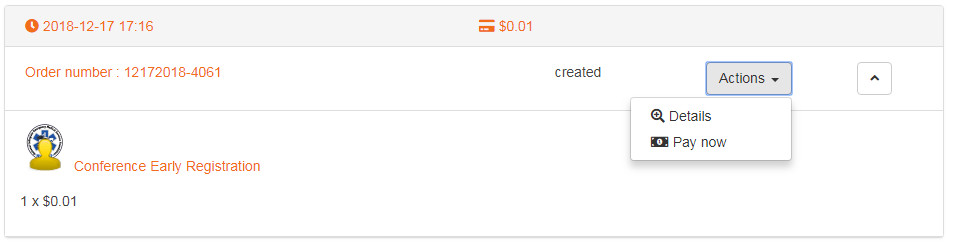
- On the following page, pick "PayPal" from the Payment Method list, then click the "Next" button.

- You will be redirected to PayPal to finish payment.
If your offline payment order was not paid within fourteen days of creation, it will have been automatically cancelled and the Conference Invoices page will list the order as "cancelled" instead of "created." Please see the following question for how to proceed in that case.
Q: I didn't pay within the 14-day window and I received an e-mail telling me I was cancelled. What do I do now?
A: If your existing registration shows as "Cancelled," you may re-register without issue. If your existing registration is still unpaid but not yet cancelled, the system will not let you register again. Instead, please follow the directions above to pay the order.
Q: I sent my check or purchase order prior to the deadline, but I received an email saying my order was cancelled. What do I do?
A: The cancellation emails are sent automatically by our system, but our staff will use the actual receipt date of your check or purchase order in determining whether payment was received on time. If your Purchase Order or check was sent by the deadline, our staff can reinstate your order and set it to paid, even after the 14-day deadline. If you are concerned about meeting the deadline and are paying by Purchase Order, you may also send a scanned copy to
Q: How can I see how many unspent tokens my organization has?
A: You must log into the NCEMSF site as the organization. Once logged in, you should see an item under the Conference menu item for "Token Administration." Click on that link and you will see your history of token purchases and their usage.
Q: I am having issues paying with PayPal. Why might this be?
A: There are several potential causes for PayPal issues. Please see below for some suggestions.
- University-imposed limits on the card: While a college/university purchasing card can be used at places that accept credit cards (including PayPal), it is not exactly the same as a credit card. Your institution may have limits on the card. These can include a daily spending limit, a per-vendor daily limit, a limit on the number of transactions per day, as well as restrictions on specific vendors (like PayPal). If your card is rejected, you should contact your school's department that issues the cards (often the purchasing department or controller's office). They can help you identify the cause of the declined payment, and potentially adjust the card limits to let your register or provide information on alternate methods of payment. If purchasing tokens, you can also try breaking your token purchase into several smaller purchases. Please note that each smaller order will have its own token code, so keep track of how many students register with each code so as to avoid a registration being rejected because the token code has reached its maximum number of uses. Also, be aware that some Universities specifically prohibit splitting purchasing card transactions to get around a spending limit, so work with your school's purchasing department to find out what will work.
- Card not associated with a PayPal account: In an effort to prevent fraud, PayPal may not allow you to pay with a credit card and not log in. To fix this, create a PayPal account associated with the purchasing card, and verify the account prior to trying to make the token purchase. Be sure to associate the account with a squad email address (not your personal email) so that other members of your group can access it (see next issue).
- Card is associated with another PayPal account: PayPal may prevent one card from being used with multiple accounts. If a PayPal account was previously created by someone from your institution and associated with the card you are trying to use, you will need to log into the existing account first. You may need to contact past officers to find that information.
- Card is associated with a cancelled PayPal account: If a past officer created a PayPal account for the credit card you're trying to use, PayPal may not let you use the card without logging in, even if the original account was cancelled. Creating a new account and verifying the card may fix the issue, or you may need to work with your institution's purchasing department to get a new card issued.
Q: Why is my PayPal order still marked as "created" on the order status page, or why did PayPal send me an email saying my order could take several days to complete?
A: PayPal normally uses an Instant Transfer for funds, meaning that NCEMSF receives notification of payment almost immediately upon completion of the PayPal checkout process. However, PayPal will only offer the Instant Transfer method if the PayPal account is linked with a credit or debit card. If your PayPal account is only linked to a bank account, then PayPal will send funds via eCheck. This is an electronic payment which requires that PayPal contact your bank and request a transfer that is then routed to NCEMSF via PayPal. This process takes several days, and PayPal's system will only notify us that payment is complete once your bank confirms the funds are sent (this is to prevent fraud). Once NCEMSF is notified by PayPal that the funds were received, your order status will be automatically updated and processed by our system. This process normally takes three to six business days, and for eCheck orders placed near a registration deadline, NCEMSF will honor the price of items at the time of purchase, meaning you will not be charged a higher rate even if the funds arrive after a registration deadline has passed. However, our Policies state that all orders must be paid in full by the start of the Conference, so if ordering in the week before the Conference starts, please ensure that your PayPal account has a credit card as a backup funding source to avoid funds being sent as an eCheck. Further details can be found on PayPal's site by using the Help link and searching for "eCheck."
If your PayPal account has a credit card linked to it, you will not be shown the eCheck option during PayPal checkout and all funds will be sent via Instant Transfer. In this case, if your PayPal order is delayed or not showing as confirmed/shipped on our site, please forward your PayPal confirmation email to
Q: What is an "Institutional Purchase Order"?
A: A purchase order is an agreement from your college/university to a vendor (like NCEMSF) to pay for certain goods or services in a specified period of time. The purchase order process typically proceeds as follows:
- You tell your purchasing department or other appropriate university department that you wish to purchase a certain quantity of registration tokens from NCEMSF at a specified price.
- The purchasing department issues a purchase order.
- You purchase the tokens, selecting "Purchase Order" as the payment type. Enter the PO Number in the appropriate field.
- You send the purchase order to NCEMSF, via mail, email, or fax.
- Upon receipt of the purchase order document, we approve the order and the tokens are issued.
- NCEMSF sends an invoice to your school's purchasing department for the total amount of the order.
- You coordinate with your school's purchasing department to confirm that the goods you requested (tokens) were received, and the purchasing department pays NCEMSF.
This method allows NCEMSF to work with your school's purchasing department, saving you from having to deal with checks or credit cards. And it gives the purchasing department assurances that the money was spent on the requested goods and that the goods were received prior to them releasing funds. Please note that the purchase order process may take time to set up, and you may need to work with NCEMSF and your purchasing department to set NCEMSF up as an approved vendor, so please allow time if you chose to pay via purchase order (the time needed depends on your institution). If your purchasing department requires NCEMSF's W-9 or other tax documentation, it can be found here. All purchase orders sent to NCEMSF must be complete in order to be accepted (including all necessary signatures). If you send us your purchase order via email or fax in order to meet the 14-day deadline, please also mail us a hard copy (which does not need to arrive prior to the 14-day deadline, so long as we did receive the electronic copy within the allowed time).
Q: How do I pay with a token code?
A: Token codes are entered during registration checkout. To register with a token code:
- Log in to the NCEMSF website.
- In the Conference menu, select Individual Registration.
- Select "Add to Cart" on the registration option for the current registration period (you should only have one choice).
- On the checkout page, look below the menu bar, but above the cart contents and payment options, for a box for your token code. Enter the token code in that box, then click the "Add" button to the right of the box. Please see below for an example of what this looks like. Do not use the Purchase Order payment type option.
- The cart will refresh, and if your token code is valid, the cart will show a zero balance and you will no longer be given a choice of payment options.
- To submit the registration, check the box below the cart contents to accept the terms and conditions then click the "Finish" button at the bottom right of the screen.
- You will receive an email from us letting you know your order was created, and then within a minute you should receive a second email confirming your registration. The registration confirmation email will contain a registration number starting with "DT-".

Q: Something went wrong when I tried the directions above, and now I have an unpaid registration. How do I apply a token code to it?
A: If you meant to apply a token code, please do not create a new website account to place the order again. Instead, please read below and select the appropriate set of directions.
If the order is still unpaid, begin by visiting the Conference Order History page. Once on that page, look to the right of your order, pick the Actions menu, and select the Cancel item. You can then reattempt the order as described above.

If your order shows as Confirmed or Shipped, that means the order has already been paid and can no longer be canceled by you. If it is before the refund deadline as described in the Fees and Policies section of our website, then you may be able to request a refund. After that date, refunds are not granted.
If your order does not show in the Order Status page, then it likely means it has not yet been paid. Please check your shopping cart, or try placing the order again. If the shopping cart link immediately redirects you to the Conference homepage, that means you do not have any open orders in your cart.
If you still encounter issues or have further questions, please contact us at
Q: I tried to add a registration (or pre-conference activity, skills lab, skills classic registration, etc) but the website gave me a message that my cart is empty. Why is it doing this?
A: This is most likely due to having a registration (or other item) already created in our system. Please visit your orders page to see your order history. If you see the item you are trying to submit and it has a status of Confirmed or Shipped, then you are fully registered (or signed up if it is for an add-in activity). If it shows with a status of Created, then the record exists but is unpaid. In this case, if it is a registration and you meant to use a token code, see the directions above to cancel the unpaid registration so you can start with a new registration and apply the token code. If you are paying via another method, see the question above on changing payment methods.
It is also possible that you have an item still on your shopping cart. You can check your cart here.
If none of those options work, please contact us at
Q: I would like to attend the Conference from outside the United States, but this requires a visa. Does NCEMSF provide invitation letters for visa applicants?
A: Unfortunately, NCEMSF does not provide invitation letters to attendees prior to the Conference, for the purposes of visa applications or otherwise. Individuals looking for documentation in support of a visa application should instead consider registering for the Conference and using their registration confirmation email as proof of their intent to travel. This has been successfully accepted for visas in the past.